- Product

- Pricing
- Affiliate Program
- Developers
- Resource
 EN
EN
I do not trust a browser profile just because the IP looks right.
BrowserLeaks is a browser testing tool that shows the actual data your browser exposes, including IP address, WebRTC leak status, Canvas, WebGL, fonts, JavaScript values, timezone, and language consistency. That is usually the first thing people miss: a profile can show the correct proxy IP and still leak through fingerprinting APIs or inconsistent settings. For digital marketing agencies, affiliate marketers, e-commerce sellers, social media managers, Web3/crypto teams, and anyone running multiple accounts in isolated browser environments, that gap is where bans, flags, and account linkage often start.
That is why I used BrowserLeaks for this MoreLogin review. It gives raw browser signals instead of a simple score, which makes it more useful for real testing. In this article, I use it to check IP and proxy behavior, WebRTC leaks, Canvas and WebGL fingerprinting, font detection, JavaScript and timezone consistency, and the role of proxy reputation in whether a profile looks coherent.
The test setup was simple.
The MoreLogin profile used a macOS fingerprint with Chrome 142. The proxy pointed to the United States, and the profile timezone was set to America/Los_Angeles.
That match matters. When I test an antidetect browser, I care less about whether every value is hidden and more about whether the values belong together. A US IP with a US timezone and English browser language looks normal. A US IP with a mismatched timezone, strange language, and broken APIs starts to look like a patched setup.
That was the main standard for this review.
The BrowserLeaks IP page showed the proxy-facing IP, not the local machine IP.
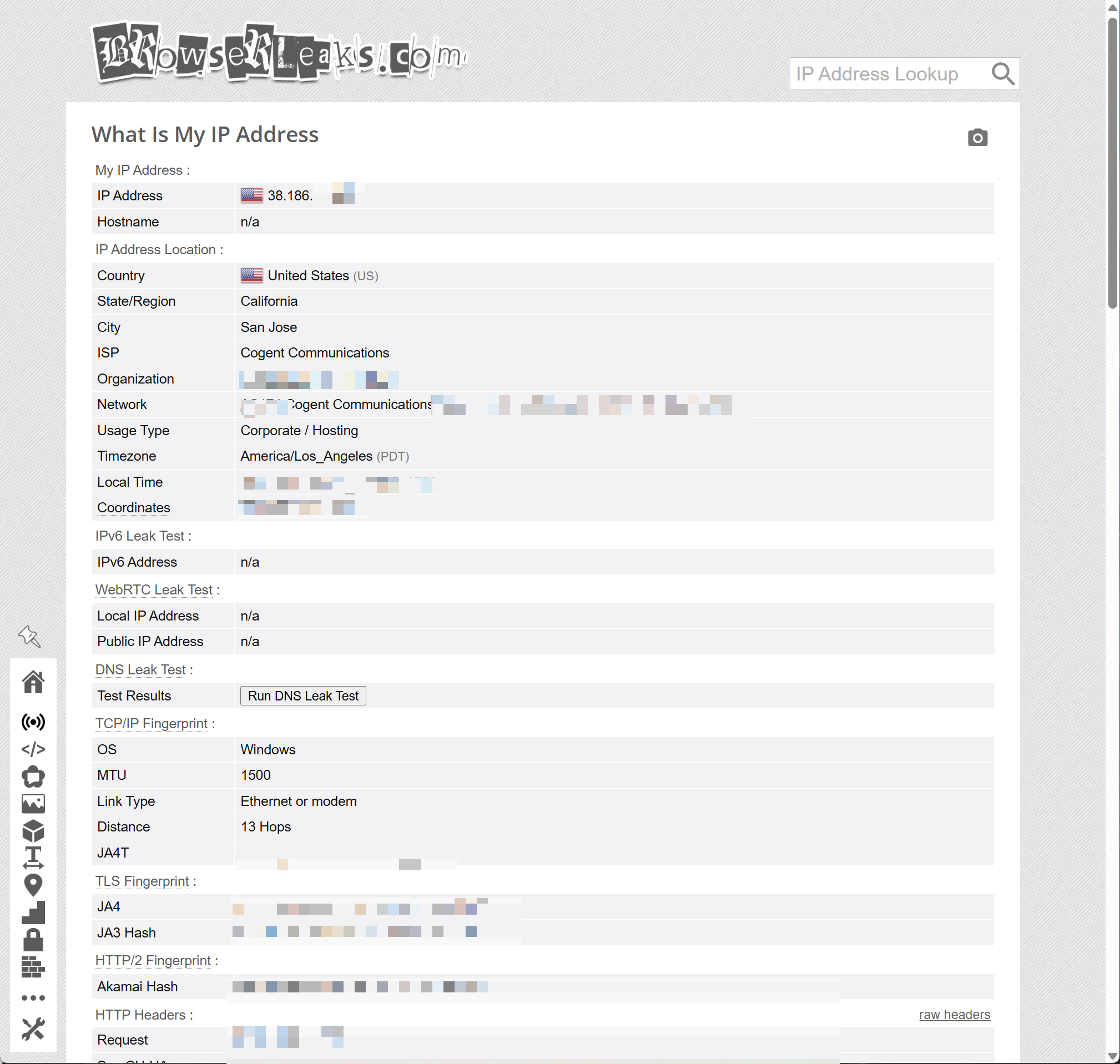
This is a good base result. The browserleaks ip result matched the expected proxy region. The timezone also matched the IP location. There was no IPv6 leak on the page.
One thing did stand out. BrowserLeaks listed the usage type as Corporate / Hosting, while the MoreLogin proxy setting showed Residential. I would not treat this as a MoreLogin failure. BrowserLeaks is reading IP database information, and different IP databases often classify the same address differently.
So I checked the same IP on IPHub.
This is a useful contrast. BrowserLeaks gave a hosting-style usage label, while IPHub did not flag the IP as bad. My read is that the browser profile itself looked consistent, but the proxy reputation needs separate checking.
That is the honest way to judge this result. MoreLogin can control the browser profile layer. It cannot force every third-party database to classify a proxy as residential. For account work, I would still test the proxy in more than one checker before using it on stricter platforms.
WebRTC is one of the first things I check after IP.
A profile can pass a normal IP lookup and still expose the real ip address through webrtc ip handling. WebRTC leak detection checks whether the true ip address is exposed with a vpn active, because WebRTC can still bypass vpn routing.
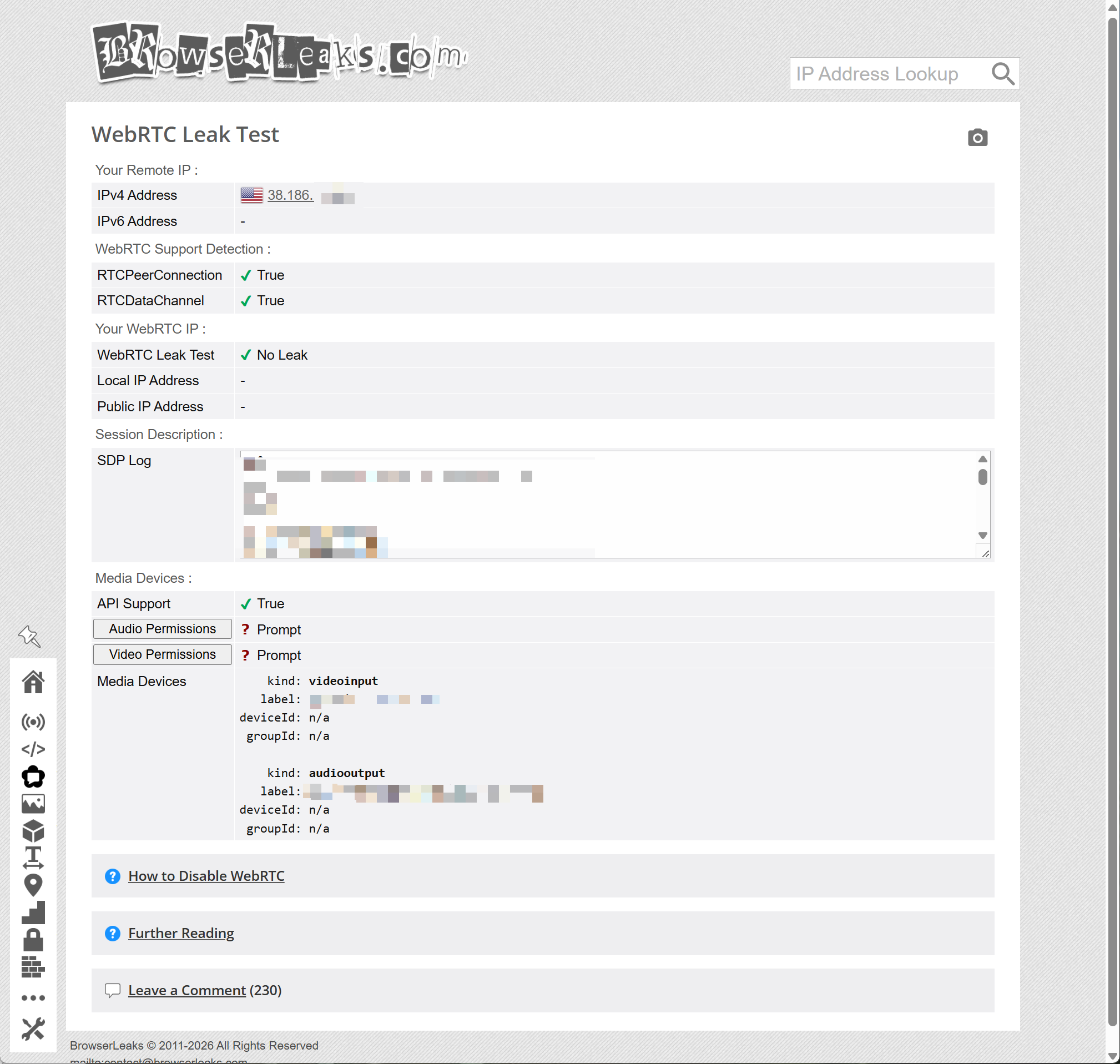
The WebRTC result in this test was clean, and BrowserLeaks uses RTCPeerConnection for this check.
This is the right kind of result. WebRTC support was still available, but it did not expose the real network address.
I prefer this over simply breaking WebRTC completely. Some sites expect normal browser functions to exist, and leaks can happen during peer connection negotiations when a stun server helps gather candidates. If too many APIs are blocked, the profile can look more suspicious, not less. Here, BrowserLeaks showed support for WebRTC, but the leak fields were empty.
For the MoreLogin profile, this was one of the strongest test results. The proxy IP was visible where expected, and the real IP was not exposed.
Canvas is where many people misread the result.
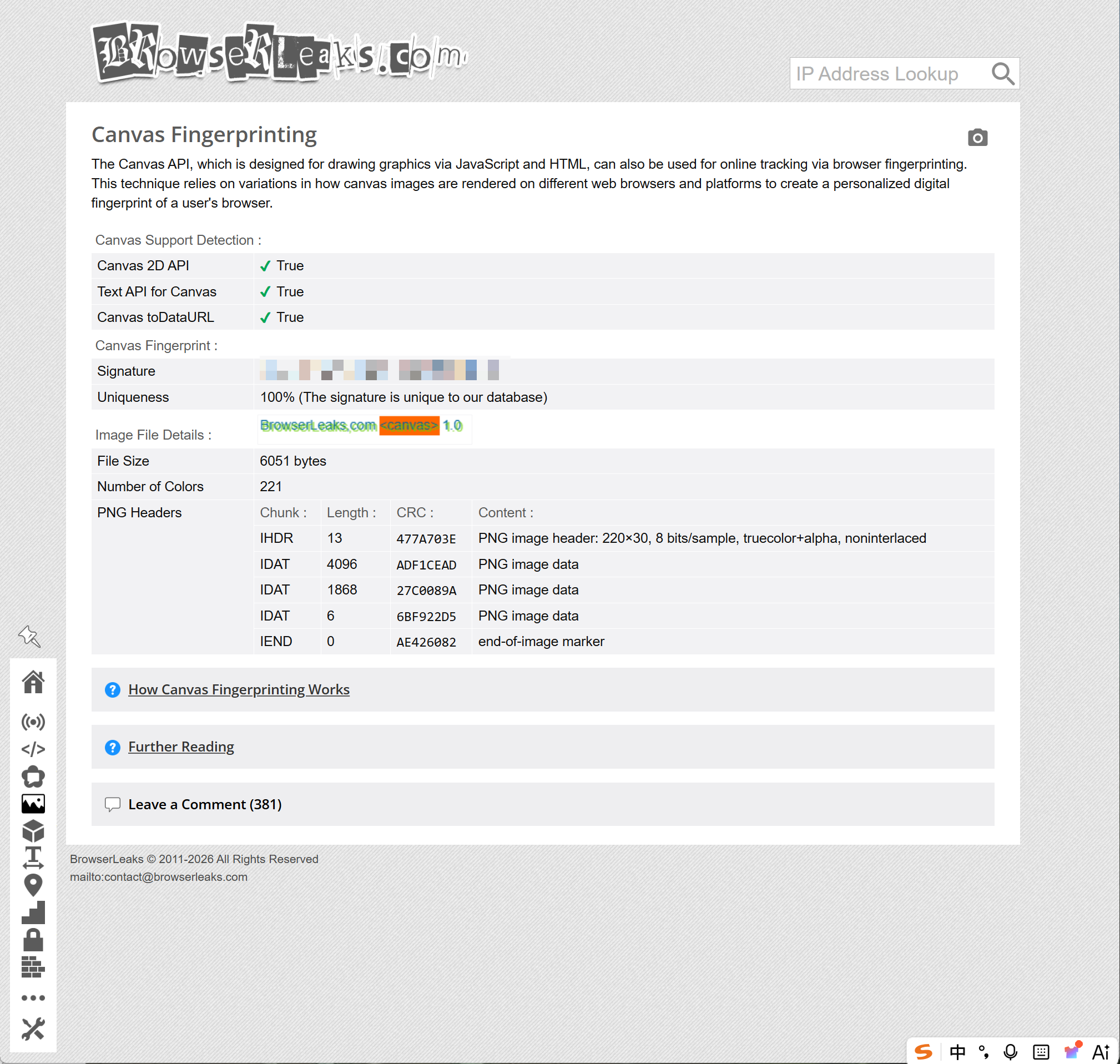
A unique Canvas fingerprint does not automatically mean failure. This is commonly called canvas fingerprinting, and it works through rendering differences to identify users. The bigger question is whether the result looks stable and realistic, or whether it looks blocked, blank, or randomly changed.
Here is what BrowserLeaks showed:
The profile returned a normal Canvas signature. It did not return a null value. It did not show a broken Canvas API. That is what I want to see.
For multi-account browser work, the worst setup is often not the one that exposes data. It is the one that exposes a weird pattern. A browser that blocks Canvas too aggressively can stand out as much as a browser that leaks too much.
This MoreLogin profile handled Canvas in a more believable way. It returned a readable fingerprint, and the output reflected how the user's device handles the rendering process, not a crude block. For readers who want more background on how this works, the broader topic is browser fingerprint tracking, not just IP masking.
WebGL gives a closer look at the graphics layer. It can expose renderer data, GPU-related values, shader behavior, and browser graphics support. Its output is also shaped by the hardware configuration and the operating system, not just the browser graphics layer.
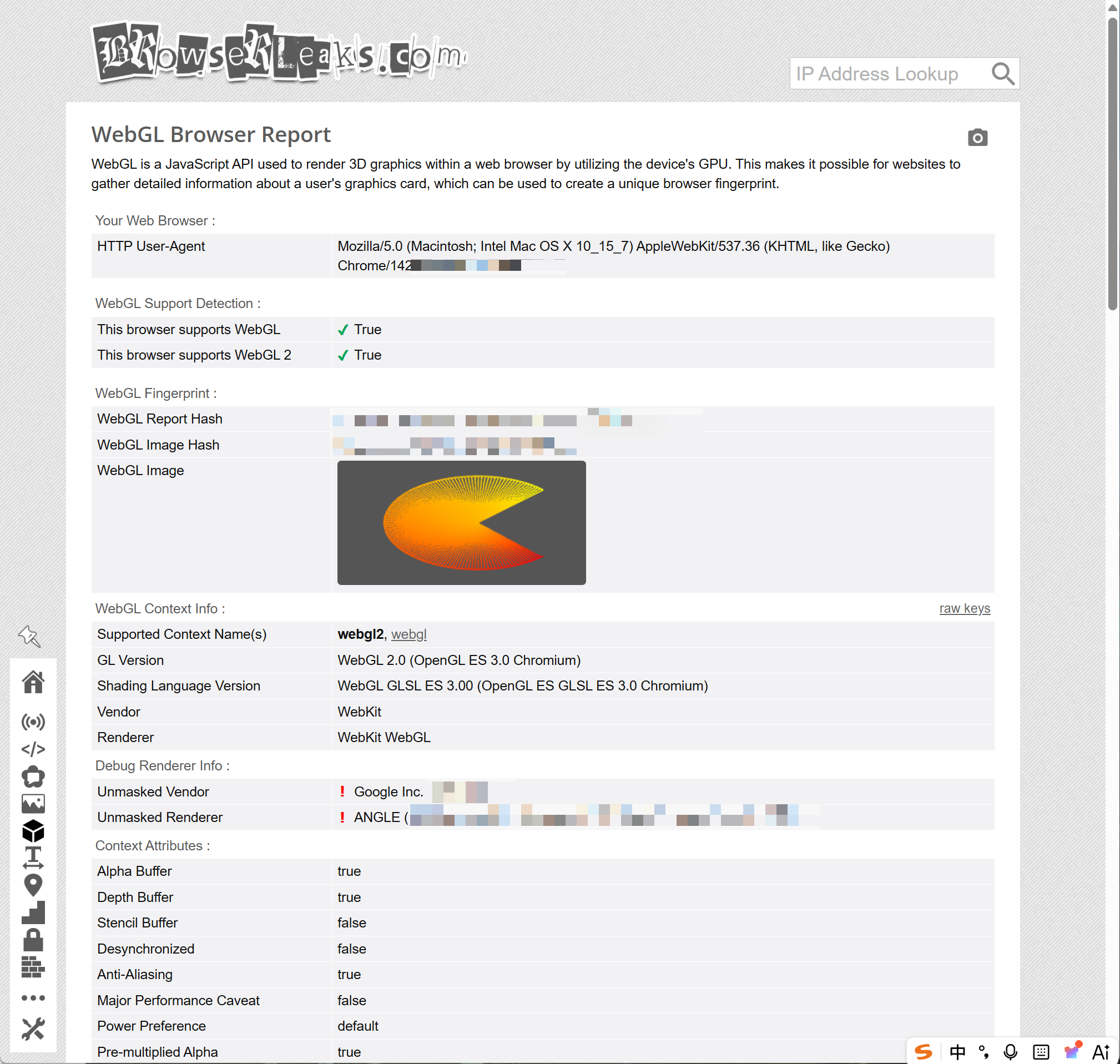
In this test, WebGL was active.
The profile claimed macOS with Chrome 142, and the WebGL page also showed a Chrome 142 User-Agent. WebGL and WebGL2 were both supported.
The unmasked renderer pointed to an Intel graphics stack through ANGLE. That is not unusual for Chromium-based browsers. What I would worry about is a renderer that screams virtual machine, software-only rendering, or a value that clearly conflicts with the claimed environment.
I did not see that kind of obvious issue here.
This does not mean WebGL is impossible to use for tracking. It means the MoreLogin profile did not expose an obviously broken or contradictory WebGL setup in this test, and these values are part of broader browser capabilities checks.
Font fingerprinting is easy to underestimate.
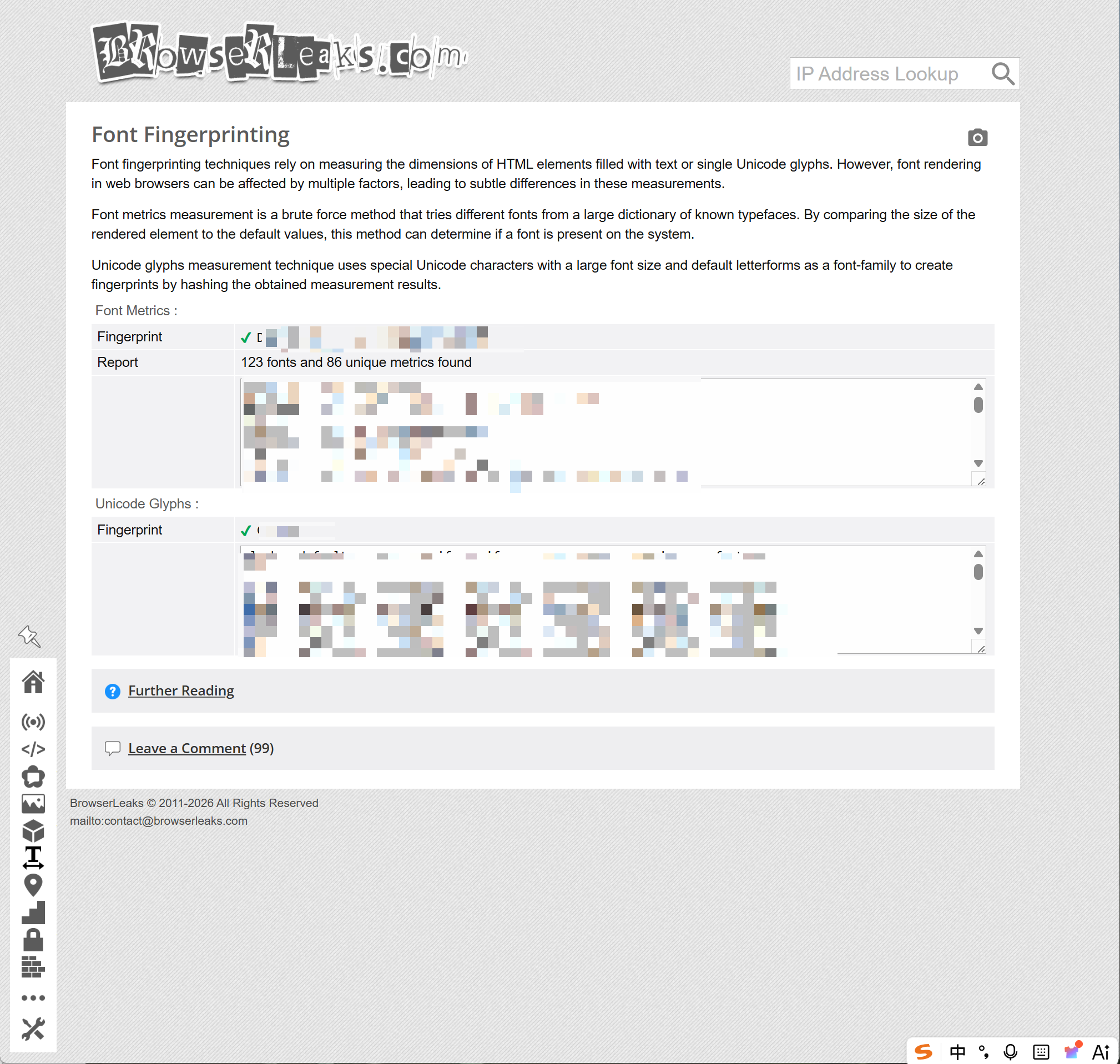
A site does not need your full font list to get value from font data. Browser fingerprinting may use various characteristics to track browsing behavior, including signals from installed fonts, system fonts, and text-rendering metrics. It can measure text dimensions, check Unicode glyph rendering, and compare font metrics. These details can become part of the browser identity.
BrowserLeaks showed this result:
This looked like a real font environment, with what appeared to be a normal set of user's system fonts. The profile did not return an empty font list, and it did not look like fonts were simply blocked.
That is a positive result. A normal desktop browser should have fonts. If a profile exposes almost nothing, that can be just as suspicious as exposing too much. In this case, MoreLogin returned enough font data to look like a usable browser environment.
The raw font fingerprint should stay masked in public screenshots. It is part of the profile identity and does not need to be published for readers to understand the test result.
The JavaScript page is where basic profile mistakes become visible.
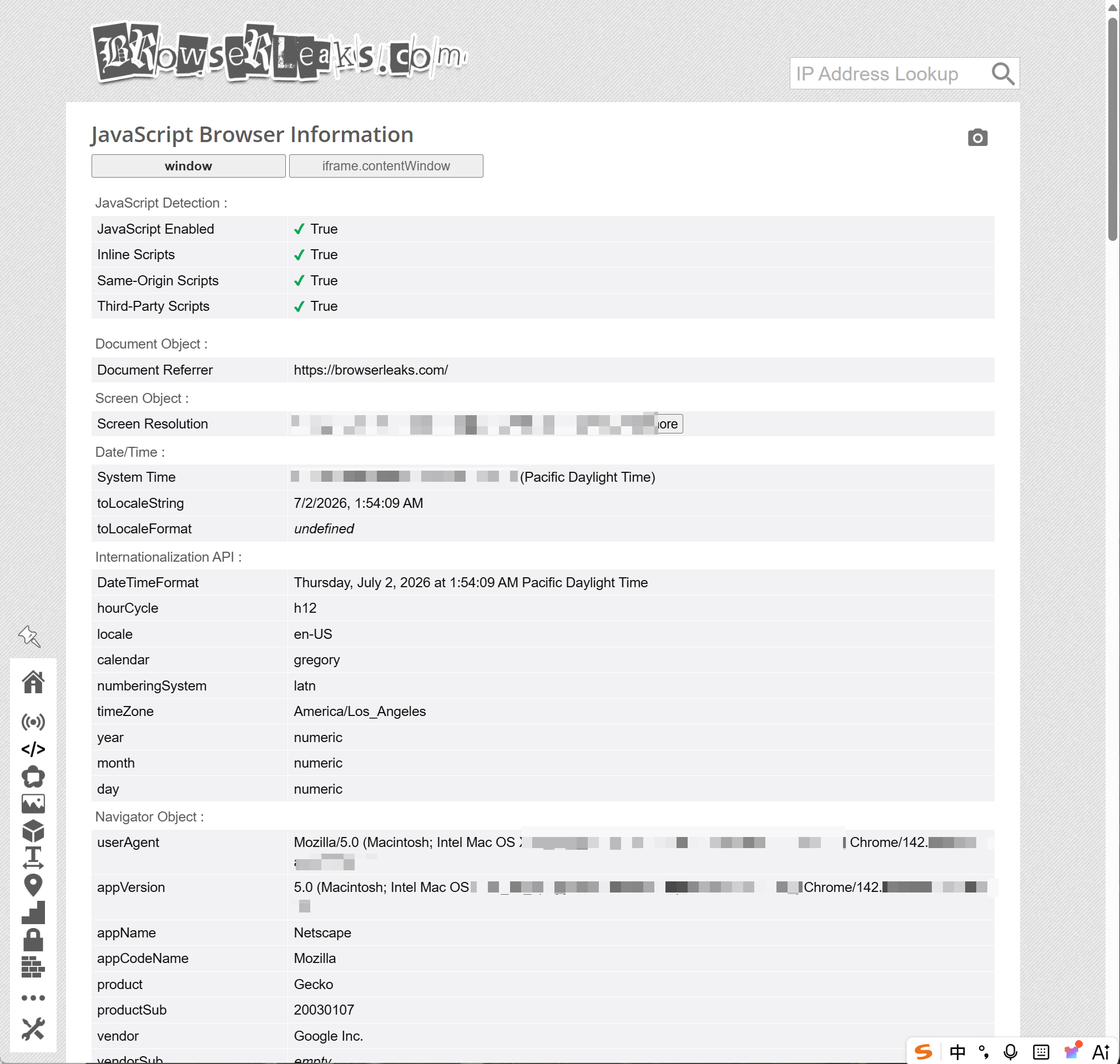
BrowserLeaks can read values from the javascript api, along with User-Agent, screen size, local time, timezone, locale, app version, browser vendor, and script support, and it can also inspect some user permissions plus capability checks. These are not advanced signals, but they are often where bad profile setups fall apart, especially in supported features and features detection consistency review.
The MoreLogin profile showed:
This is a coherent setup. The IP was in California. The timezone was America/Los_Angeles. The language was en-US, and the language settings matched the profile. The User-Agent matched the macOS Chrome profile.
That is what I would expect from a properly configured browser profile. Nothing here looked like a profile stitched together from random values.
I would still mask the exact screen resolution and viewport in public images. Those values are not secret in the strict sense, but they are part of a fingerprint. The article only needs to show that the values were readable and consistent, not the exact numbers.
The test result was stronger than a basic IP check, because BrowserLeaks tests review more than 20 distinct fingerprinting surfaces.
MoreLogin did well in the areas that matter most:
The proxy IP showed the expected US location.
The timezone and language matched the IP region.
WebRTC showed No Leak.
Canvas returned a normal readable output.
WebGL was supported and did not show an obvious conflict.
Font fingerprinting returned a real font environment.
JavaScript values were readable and consistent with the profile.
These browser fingerprinting checks assess whether the profile creates a unique identifier that can track users.
The best part is not that every field was hidden. That is not how a believable browser profile should work. The better sign is that the profile looked normal across different checks.
This is why I would not judge MoreLogin only by one BrowserLeaks page. The IP page tells one part of the story, and BrowserLeaks reveals what your browser reveals to websites across those checks. WebRTC tells another. Canvas, WebGL, fonts, and JavaScript show whether the profile behaves like a real browser or a rough spoof.
For this test, the MoreLogin profile looked coherent.
The main weakness was outside the browser layer. IP reputation was not perfectly consistent across checkers. BrowserLeaks showed Corporate / Hosting, while IPHub showed Good IP. That is a proxy quality and database issue, not a browser fingerprint issue.
I did not see a real IP leak in this test. BrowserLeaks is a diagnostic tool for leak and fingerprint checks, not a malware scanner or a patch auditor, so it does not detect malware or identify unpatched security vulnerabilities. WebRTC was clean, and the browser profile did not expose a broken Canvas, WebGL, or JavaScript environment.
The one point I would watch is IP reputation.
When one tool says Corporate / Hosting and another says Good IP, I would not panic. But I also would not ignore it. For low-risk browsing, it may be fine. For stricter account platforms, I would test another proxy or use a proxy with cleaner reputation.
Here is how I would handle it in practice.
Use BrowserLeaks first to check the browser layer. Look at IP, WebRTC, Canvas, WebGL, fonts, and JavaScript consistency. Then use an IP reputation checker like IPHub to see whether the IP itself is likely to be flagged, and run a dns leak test to confirm dns queries are routed the way you expect on the network side.
Do not treat one green result as enough. A good profile needs both sides:
This is also where many users misunderstand antidetect tools. A browser profile can be configured well, but it also needs to stay internally consistent; if the proxy is poor, the session can still look risky. The browser and proxy have to work together, and a dns leak can still expose the wrong path even when the browser setup looks fine.
For this MoreLogin test, I would not change the browser profile first. I would check more proxy options before making any browser-side adjustment.
MoreLogin performed well in this BrowserLeaks test as an anti detect browser built to help mask a user’s digital identity and fingerprint.
The profile showed a clean WebRTC result, a consistent US-based environment, readable Canvas and WebGL outputs, normal font detection, and JavaScript values that matched the selected profile. It did not look like a browser with random settings thrown together, and tools like this can spoof WebRTC requests to reduce webrtc leaks and prevent IP leak exposure.
The only caution is the proxy reputation label. BrowserLeaks and IPHub did not describe the IP in exactly the same way. That is worth checking before using the profile for important account work.
My final judgment is this: MoreLogin gives users a solid browser profile layer, but the final quality still depends on how carefully the proxy, timezone, language, and account behavior are managed. That is not a weakness. That is how this type of setup works in the real world.
For users who need isolated browser profiles for account management, testing, or team workflows, especially when handling multiple accounts, MoreLogin is a practical option because it brings fingerprint control, proxy setup, profile management, and collaboration into one workspace.
Is BrowserLeaks reliable for testing MoreLogin?Yes. BrowserLeaks is useful because it shows the actual data a browser exposes and supports a more detailed analysis of fingerprint surfaces and tls fingerprint signals. It does not guarantee platform safety, but it helps find leaks and mismatched settings.
What does the browserleaks ip test show?It shows the visible IP, location, ISP, timezone, IPv6 status, WebRTC signals, and network fingerprint details. That IP page is separate from BrowserLeaks SSL/TLS diagnostics, which reveal supported versions and security configurations.
Did MoreLogin leak the real IP in this test?No. The WebRTC result showed No Leak. Local IP and real public IP were not exposed.
Is 100% Canvas uniqueness bad?Not by itself. Many real browsers can have unique Canvas results. A blocked, blank, or unstable Canvas value is usually more concerning.
Why did BrowserLeaks and IPHub show different IP signals?They use different databases and detection logic. One tool may label an IP as hosting, while another may mark it as clean.
Is browserleak the same as BrowserLeaks?People sometimes search for browserleak, but the tool name is BrowserLeaks.
Does passing BrowserLeaks mean the profile is fully safe?No. It only means this profile did not show obvious leaks in these tests. Proxy quality, cookies, account history, and user behavior still matter. Good profile handling and automation practices still matter when you manage multiple accounts.
What are JA3 and JA4 fingerprints?They are identifiers based on TLS handshake parameters. A tls extensions list, cipher suites, and other ClientHello values can be used to build JA3/JA4 fingerprints that help identify browsers.
Do automation tools matter for multi-account work?Yes. Automation tools such as APIs and synchronizers help streamline multi-account management tasks, and Dolphin Anty is another tool some teams use to manage isolated profiles effectively.

 EN
EN